Pen Scanners: Compare OCR, Reading & Portable Scanning Pens
Short answer: Pen scanners come in three main types: OCR pens that type text into a device, reading pens that read text aloud, and translation pens. Connected pens need a laptop or phone; standalone pens have their own screen and speaker.
Key takeaways
- A pen scanner is a handheld device that captures printed text from a page, one word or line at a time, using a small camera or optical sensor in its tip.
- The three main types are OCR pens (text goes into a document), reading pens (text is read aloud) and translation pens (text is translated). Some devices combine two or all three.
- Connected pens rely on a computer, phone or tablet. Standalone pens have their own screen, speaker and storage.
- Start with what you need the pen to do, then check connection type, languages, offline use and exam rules. Price is the last filter, not the first.
- ScannerReader groups its 31 catalogue pens into reading, OCR and translation categories, and the shop shows all of them.
Choose based on what you need
A pen scanner is a handheld device designed to capture printed text directly from a page. But "pen scanner" covers several different product types: OCR-focused devices for converting printed text into digital text, reading-focused devices for hearing printed words aloud, translation-focused devices for scanning and translating unfamiliar text, and multifunction devices built for research or study that combine several of these.
This page is the hub for the whole family. It explains how the types differ and sends you to the guide that goes deepest on each one. If you only want the definition, read what a pen scanner is. If you are deciding between listening and typing, read reading pen vs. OCR pen.
What are the types of pen scanner?
There are three main types of pen scanner, defined by what happens to the text after it is scanned: it is typed into a device, spoken aloud, or translated. Each type has its own guide, product category and buying questions.
OCR pens: scan text into a document
An OCR pen turns printed text into digital text that you can edit and quote. It suits students, researchers and office workers. Scanmarker Air and C-Pen Connect are connected examples. Read OCR pens for the full guide, or browse the OCR pens category.
Reading pens: hear text read aloud
A reading pen speaks the text through a built-in speaker or headphones. It suits readers with dyslexia, low vision and English learners. C-Pen Reader 3 and IRISPen Reader 8 are standalone examples. Read reading pens for the full guide, or browse the reading pens category.
Translation pens: scan and translate
A translation pen shows or speaks a translation of the scanned text. It suits travelers, language learners and multilingual families. IRISPen Air 8 and C-Pen Lingo 3 are examples. Read translation pens for the full guide, or browse the translation pens category.
Multifunction pens
Many standalone pens combine jobs. Scanmarker Pro reads aloud, includes a dictionary and translates. C-Pen Lingo 3 is listed as a hybrid reader and translator. The category label in our catalogue shows each pen's main strength, not its only function.
How does a pen scanner work?
A pen scanner works by capturing images of a printed line as you glide it across the page, recognizing the characters with OCR, and then sending the result to a speaker, a screen or a connected device. The tip does the scanning, and the software does the rest.
- Rest the tip flat at the start of the text.
- Glide it along the line at a steady pace.
- Lift at the end. The pen recognizes the characters.
- The text is typed into a document, read aloud, or translated, depending on the pen.
For more detail on each stage, read how pen scanning works and the broader explainer pen scanning explained.
Connected vs. standalone pen scanners
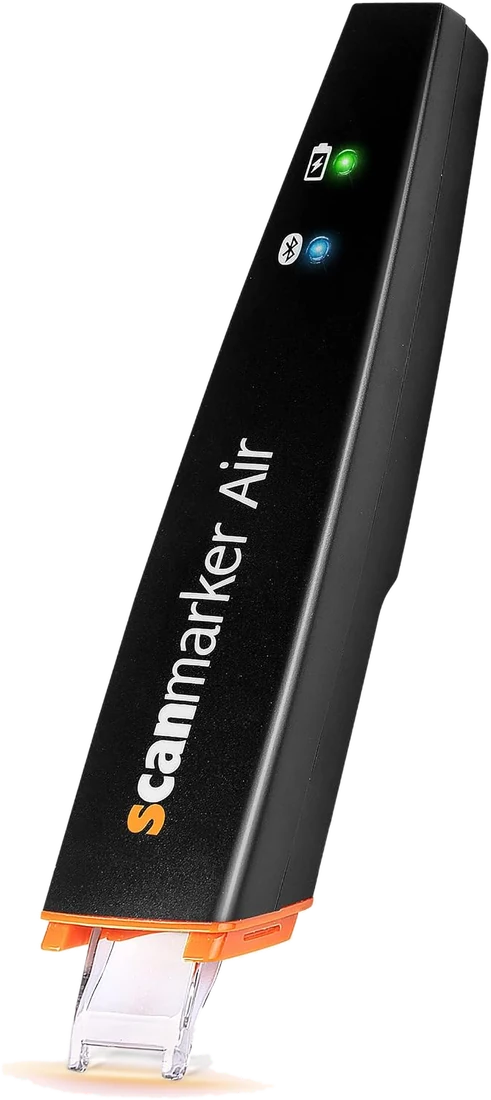
Connected scanning pens use a computer, phone, or tablet to display and process the scanned information. They can be useful when you want direct text entry, editing, larger screens, file management, or integration with existing software.
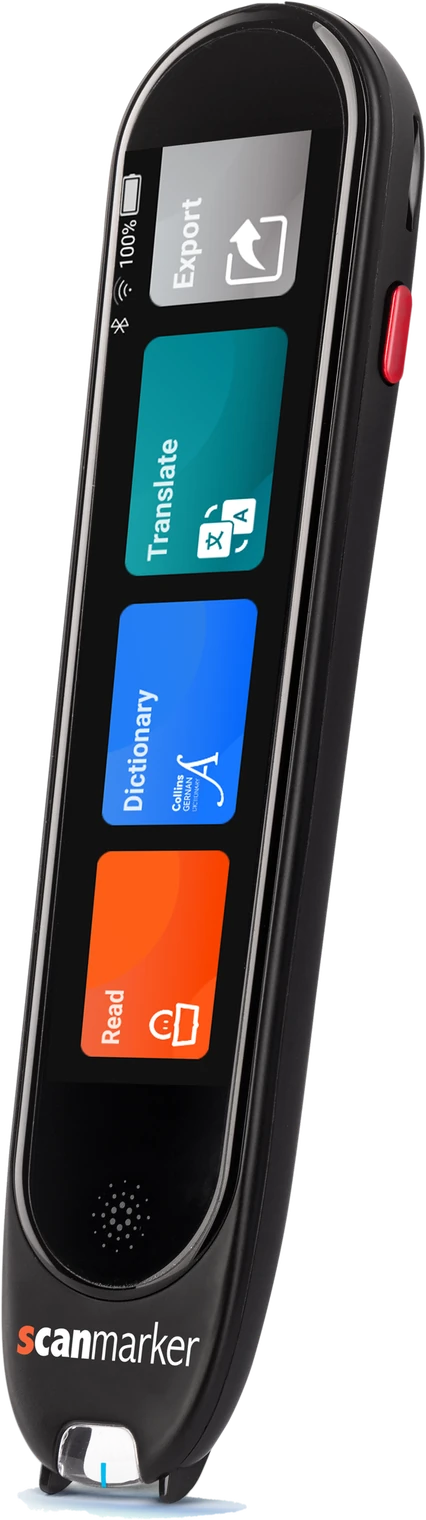
Standalone devices provide more of the experience directly on the device. They can be useful when you want portability, reading without a computer, fewer devices to carry, a built-in screen, or integrated reading or translation features.
Current products demonstrate both approaches: Scanmarker Air is a connected pen that transfers text to a computer or mobile device, while Scanmarker Pro, Scanmarker Max and IRISPen Reader 8 are standalone touchscreen device that works independently.
For the full side-by-side table, see the pen scanner comparison.
Which one should you pick?
- Choose connected if you write in Word or Google Docs, take notes on a laptop, or want to keep costs down. Connected pens in our catalogue sit in the $100 to $199 price band.
- Choose standalone if you want to read or translate without a laptop or phone, such as in class, on the bus or while traveling. Standalone pens range from under $100 to the $400+ band.
- Choose a hybrid workflow if you need both. Some standalone pens also export text to a device, and some connected pens add reading or translation through their app.
In our catalogue, 24 pens are standalone and 7 are connected, which reflects how much the market has shifted toward devices with their own screen and speaker. The connected ones are Scanmarker Air, Scanmarker Reader, C-Pen Connect, PenPower WorldPenScan Wi-Fi, PenPower WorldPenScan X, C-Pen TS1 (G2) and IRIS IRISPen Air 7.
Pen scanner types compared
The table below summarizes the three main types by purpose, connection, usual price band and typical user. Use it to decide which category to read next.
| Type | What it does | Usually works | Price bands in our catalogue | Typical user | Example pens |
|---|---|---|---|---|---|
| OCR pen | Types scanned text into a document | Connected to a computer or phone | $100 to $199 | Students, researchers, office staff | Scanmarker Air, C-Pen Connect |
| Reading pen | Reads scanned text aloud | Standalone | $100 to $199, $200 to $399, $400+ | Readers with dyslexia or low vision, students | C-Pen Reader 3, IRISPen Reader 8, Scanmarker Max |
| Translation pen | Translates scanned text and often speaks it | Standalone, often needs Wi-Fi for most languages | Under $100 to $400+ | Travelers, language learners, multilingual families | IRISPen Air 8, C-Pen Lingo 3 |
| Multifunction pen | Combines reading, dictionary, translation | Standalone | $200 to $399 and up | Mixed needs in one device | Scanmarker Pro, C-Pen Lingo 3 |
For a spec-by-spec comparison of individual models, use the interactive comparison tool or the pen scanner comparison guide.
Who are pen scanners for?
Pen scanners are for people who regularly need to move words off a printed page, hear them, or understand them in another language. The right type depends on the person.
- Students: pen scanners for students compares study tools.
- Readers with dyslexia: see the best reading pens for dyslexia and the complete guide for dyslexia.
- Older adults and people with low vision: see reading pens for low vision and seniors.
- Schools and teachers: see pen scanners for schools, and assistive reading tech for speech-language pathologists and occupational therapists.
- Researchers and writers: see pen scanners for researchers.
- Language learners and travelers: see translation pens for language learners and ESL.
Who should skip a pen scanner? If you mostly read on a screen, or need to capture whole pages, a phone or flatbed scanner may serve you better. See pen scanner vs. phone.
What are the limits of pen scanners?
Pen scanners capture one line at a time and work best on clear printed text. They are not full-page scanners, and they differ widely in offline ability, exam suitability and language coverage.
- Line-by-line capture. Whole pages are faster with a flatbed scanner or phone.
- Print quality matters. Small, glossy, curved or low-contrast print causes more errors. See pen scanner troubleshooting.
- Offline versus online. Offline coverage is usually narrower than online. Check which features work without Wi-Fi.
- Exams. Only a few models are built or locked for exams, such as C-Pen Exam Reader 2 and Scanmarker Max. Always confirm with the exam board or centre. See exam-approved reading pens.
- Funding is not guaranteed. Coverage depends on the plan or program. See insurance and Medicaid coverage for scanning pens.
How to choose a pen scanner
To choose a pen scanner, decide what you need the text to do first, then narrow by connection, languages, offline use, exam rules and budget. Working in that order avoids paying for features you will not use.
- Decide the main job: type into documents, read aloud, or translate.
- Decide whether you can rely on a computer or phone nearby (connected) or want a pen that works alone (standalone).
- List the languages you need, and check how many work offline.
- Check exam, school or workplace rules before buying a pen for those settings.
- Set a price band: under $100, $100 to $199, $200 to $399 or $400+.
- Read the matching category guide, then compare two or three pens on their product pages.
For a printable-style checklist of features, see the pen scanner buying guide. To see how we judge devices, read how we evaluate pen scanners.
Common mistakes
- Buying a connected pen when you wanted to read without a laptop or phone.
- Choosing by the total language count instead of the offline count.
- Buying a reading pen to type into documents, or an OCR pen to listen to text.
- Assuming a pen is exam-approved because it is listed as an assistive device.
Frequently asked questions
Which pen scanners are standalone?
Scanmarker Pro, Scanmarker Max, IRISPen Reader 8 and Rocket Pen work on their own with a built-in screen or speaker. Scanmarker Air is a connected pen that needs a phone, tablet or computer.
What is a pen scanner?
A pen scanner is a handheld device that captures printed text from a page as you glide it along a line. It then types the text into a device, reads it aloud or translates it. Some pens do one job and others combine several.
What is the difference between a reading pen and an OCR pen?
A reading pen speaks text aloud and usually works on its own. An OCR pen converts text to digital form and usually sends it to a computer or phone. Reading pens help you listen, and OCR pens help you capture and edit.
Do pen scanners work without a computer?
Standalone pens do. Models such as C-Pen Reader 3, Scanmarker Pro and IRISPen Reader 8 have their own screen and speaker. Connected pens such as Scanmarker Air and C-Pen Connect need a phone, tablet or computer to receive the text.
How much does a pen scanner cost?
In our catalogue, prices run from under $100 for entry translation pens, through the $100 to $199 and $200 to $399 bands for most OCR and reading pens, to $400 and above for premium models such as C-Pen Reader 3. Check each product page for current pricing.
Can a pen scanner scan a whole page?
Not efficiently. Pen scanners capture one word or line at a time, so a full page means many scans. For whole pages, use a flatbed scanner or a phone camera, or consider a camera reader such as OrCam Read 3.
Are pen scanners good for dyslexia?
Reading pens can help with access to printed text through text-to-speech. They are assistive tools and do not replace specialist teaching. A teacher, tutor or clinician can advise on whether a pen suits a particular reader.
Can I use a pen scanner in exams?
Only a few pens are designed for exam use, and the exam board or centre decides what is allowed. C-Pen Exam Reader 2 is built to exam criteria, and Scanmarker Max has an exam lock. Confirm before test day.